Monday, 28 March 2016

Week 7 (FYP2) : Buy Battery and combination of coding for this trolley follower

Objective for this week: For this week I buy the battery suited to control the movement of the motor and combination coding of detector sensor and motor to movement of trolley follower.

1. below show battery that will be used for trolley follower. i use 2 battery, first for ARDUINO UNO and second for control the motor.

this battery for ARDUINO UNO, use 12V, 2AH. for ARDUINO voltage supply low better than Supply for motor drive.

this battery for motor drive to control movement of trolley follower. use 12V, 7.2AH. for motor drive voltage supply high better than supply for ARDUINO UNO.


Wednesday, 16 March 2016

Week 6 (FYP2): Draw and design schematic circuit for trolley follower

Objective for this week: for this week I draw the circuit and test all component function for this trolley follower.


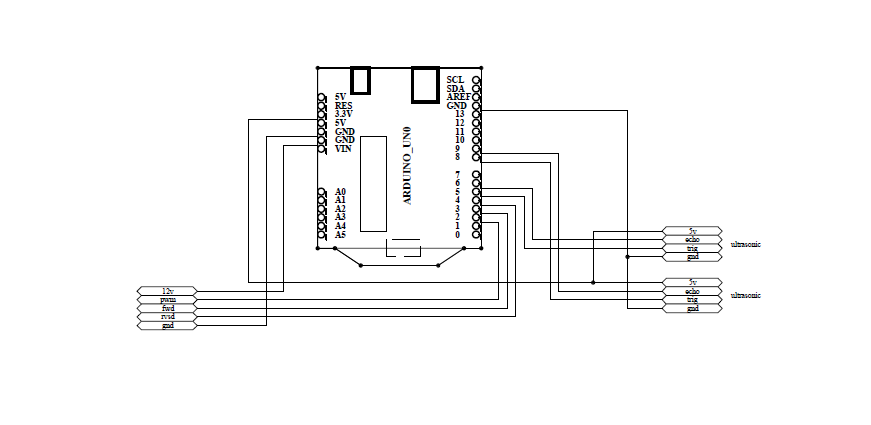
1. Draw the schematic diagram using PROTEL99SE.
software for design schematic


This schematic diagram circuit for trolley follower

for this schematic circuit for this project, I use 2 of sensor ultrasonic and 2 motor for control movement of trolley follower when the trolley moving with customer.

2. Test all component for this trolley follower.

I test arduino, sensor, resistor, capacitor and all component to test performance and function or not of all component.


this picture for time test all component
In arduino code Write a HIGH or a LOW value to a digital pin.

If the pin has been configured as an OUTPUT with pinMode(), its voltage will be set to the corresponding value: 5V  for HIGH, 0V (ground) for LOW.

If the pin is configured as an INPUT, digitalWrite() will enable (HIGH) or disable (LOW) the internal pullup on the input pin. It is recommended to set the pinMode() to INPUT_PULLUP to enable the internal pull-up resistor.


Saturday, 5 March 2016

Week 5 (FYP2): Buy trolley and Testing Motor

Objective for this week: For this week I go to hardware stores to buy the trolley and testing function motor.

1. Below show the pictures and price trolley:


Trolley to be used for final year project and based on the pictures, for the tires will use a motor to move the trolley.


2. Below show the motor i use for my FYP trolley follower:

for my project i use 2 motor left and right. for this motor support 12 V supply, rpm 60 speed. this motor can control movement of my trolley follower. can move to forward, right and left. 


Friday, 26 February 2016

week 4 (FYP2): Briefing for FYP2 and buy component

Objective for this week: go to the briefing for FYP2 and buy new component for design and test the circuit for trolley follower.

For the briefing was meant to give some explanation to all final year projects 2 student. The briefing is about: 
  • Introduction
  • Objective
  • Credits and duration
  • Scope of project
  • Title selection
  • Project assessment
  • Presentation day
  • Submission date of project
for buy new component, i buy for this component and equipment:
  1. board
  2. usb cable
  3. jumper
  4. mini board


Friday, 19 February 2016

Week 3 (FYP2):Test Ultrasonic Sensor Distance

Objective for this week: For this week I test ultrasonic sensor using ARDUINO for check the distance and set the distance for ultrasonic sensor function.  First, using a check arduino to detect and set up which can be set and the result will be available on the system monitor screen serial arduino. 

1. first test result output to show the monitor in arduino:


In the picture above there is a reading on the test and the distance sensor on the display.


2. Second test sensor using real situation for test the distance of sensor:

This below show circuit testing sensor ultrasonic:


The 5V pin of the ultrasonic sensor is connected to the 5V pin on the board, the GND pin is connected to the GND pin, and the SIG (signal) pin is connected to digital pin 7 on the board.

This below show schematic testing sensor ultrasonic:

This video is about to testing distance ultrasonic sensor:


Friday, 12 February 2016

Week 2: Change Microcontroller and buy new microcontroller (Arduino)

Objective for this week: Change microcontroller from ATMEL AVR 8- bit to ARDUINO UNO and test ARDUINO UNO function.

For this week i do and test microcontroller. First i try microcontroller ATMEL, microcontroller ATMEL is complicate then I meet my advisor and I discuss to better microcontroller. I decided to use microcontroller ARDUINO UNO because ARDUINO is easy better then ATMEL.


Step to test function ARDUINO UNO :

1. Install ARDUINO software


2. Test design ARDUINO UNO in proteus


3. Write basic coding ARDUINO UNO to test ultrasonic sensor.


Saturday, 6 February 2016

Week 1 (FYP2): New semester and update latest progress

Objective for this week: To update latest progress to the FYP advisor

For this week I met with my advisor and discuss progress for FYP2 and what should I do for this semester to complete my FYP2.
I discuss for my project and now i prepare to order this component to start my project, 

The list component i need to buy is:

1. Sensor
2. Microcontroller
3. Equipment = Trolley, Motor, and tyre controller.

Conclusion : For the conclusion on this week, i have meet my supervisor to manage the  meeting time with him and also i have get a permission from my supervisor about the idea to finalize the component that i need to use for my FYP 2